Help
1.Introduction
AILDE (Auto In Silico Ligand Directing Evolution) is developed based on the CSO (Computational Substitution Optimization) protocol which was designed to automatically perform computational substitution, energy minimization, and binding affinity evaluation. The method is a new computational approach to substitution-scanning mutagenesis of ligand and could be used as a general strategy of Hit to lead (H2L) optimization in drug and agrochemical design.
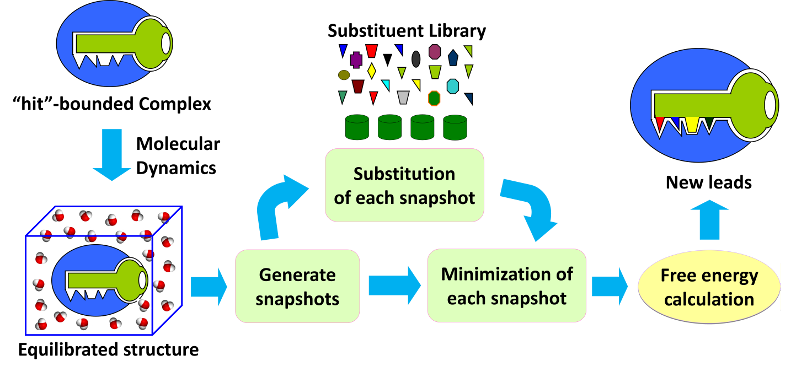
Fig 1. Workflow of CSO
2.Submit Job
- Upload a ligand-receptor complex structure file: A protein-ligand complex file (PDB format, see Notice for more about PDB) is required to upload. The complex structure file can be downloaded from PDB Data Bank. You can also use the docking result as the input complex file, some docking web servers can be used to do the docking job, for example Swissdock, e-LEA3D. Please notice that hydrogens should be deleted before uploading, otherwise the job will give out a mistake.
- Give the RMSF value: The option is used to specify whether to add a MD simulation strategy for the new compound-receptor system. The default is no MD simulation will be added, once value is given, the MD refining step will be performed and the MD simulation will stop until the RMSF of the trajectory is less than the specified value. So the smaller the value, the longer MD simulation time it will cost.
- Name your task: give your job a name, which should be made up letters or numbers. Or you can just ignore it.
- Job password and E-mail address: you can enter a password for your job if you do not want to show your job results to others, you can also ignore it. The E-mail address can be used to send a notice no matter your job is finished or error!
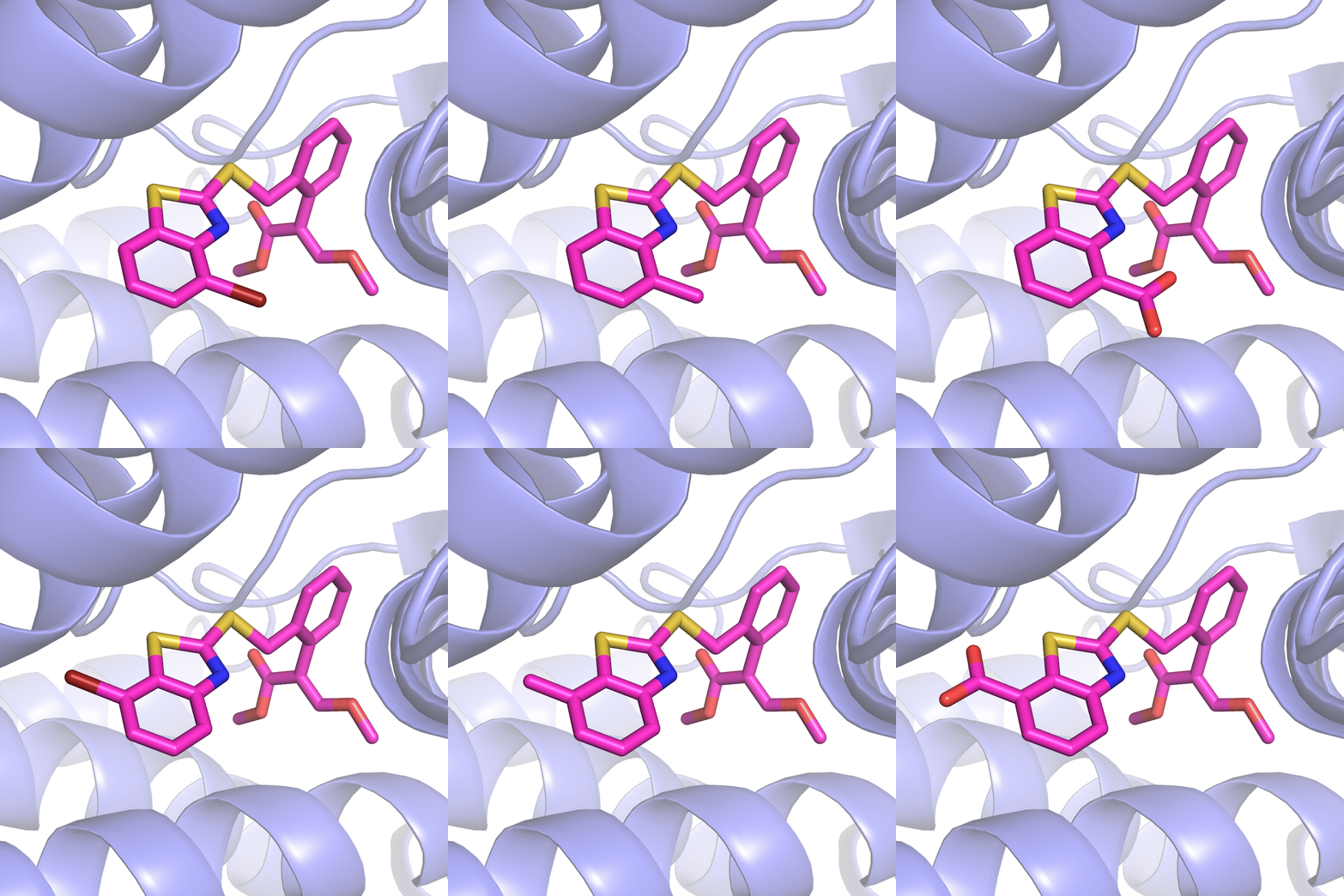
Fig 2. Substitution Scanning Strategy
The server will first RUN the initialization program to obtain all the non-standard residue(s) included in the complex. You can select one as your ligand molecule for Substitution Scanning Optimization.
3.Browse Result
You can click the button to check the status of your job, Running, Queue, Error or Finished. If the job is finished, you can click the ID of your job to access to the login page, and then input your job password to check the result of your job.
4.Notice
Q: What substituents are included in our server?
A: We select 10 small substituent groups for calculation:
                        NO.   Formula   Name
                        01   -Br        Bromo
                        02   -CF3       Trifluoromethylphenol
                        03   -CH3       Methyl
                        04   -Cl        Chloro
                        05   -COOH      Carboxyl
                        06   -F         Fluorous
                        07   -NH2       Amino
                        08   -NO2       Nitryl
                        09   -OCH3      Methoxyl
                        10   -OH        Hydroxy
Q: What residues can be identified by our server?A: In our server, only 29 residues are supported, the residue names are:
HIS, HIE, HID, HIP:the different protonated states of amino acid Histidine (H).
ALA: amino acid Alanine (A).
GLY: amino acid Glycine (G).
SER: amino acid Serine (S).
THR: amino acid Threonine (T).
LEU: amino acid Leucine (L).
ILE: amino acid Isoleucine (I).
VAL: amino acid Valine (V).
ASN: amino acid Asparagine (N).
GLN: amino acid Glutamine (Q).
ARG: amino acid Arginine (R).
TRP: amino acid Tryptophan (W).
PHE: amino acid Phenylalanine (F).
TYR: amino acid Tyrosine (Y).
GLU, GLH:the different protonated states of amino acid Glutamic acid (E).
ASP, ASH:the different protonated states of amino acid Aspartic acid (D).
LYS, LYN:the different protonated states of amino acid Lysine (K).
PRO:amino acid Proline (P).
CYS, CYM, CYX: the different protonated states of amino acid Cysteine (C).
MET:amino acid Methionine (M).
H2O:water molecule.
Other residues which do not match these names in the complex can be called non-standard residue(s), for example, co-factor(s) that sometimes can be found in a complex strcuture. These non-standard residues will be detected by our server, and generate parameters for them.
Q: What is pdb/mol2 file?
A: pdb: A processible pdb file can be obtained from Protein Data Bank or docking results which should contain ATOM record for protein atoms, HETATM record for non-standard residue (including ligand) and TER record to separate different chains and to mark non-standard residues.For HETATM record and ATOM record, columns 7-11 should be atom serial number, columns 13-16 should be atom name, columns 18-20 should be residue name, columns 23-26 should be residue sequence number, columns 31-38 stand for orthogonal coordinates for X in Angstroms, columns 39-46 stand for orthogonal coordinates for Y in Angstroms, columns 47-54 stand for orthogonal coordinates for Z in Angstroms, columns 77-78 for Element symbol. Generally, pdb files from the protein data bank are always acceptable by our server, but you may need to check your files if you get the pdb file through other ways (e.g. docking, homology modeling).
Here is a pdb file example:
Example:
                             1         2         3         4         5         6         7         8
                    12345678901234567890123456789012345678901234567890123456789012345678901234567890
                    ATOM   3001  N   TRP   378      91.533 115.037 126.730                       N
                    ATOM   3002  CA  TRP   378      90.600 113.899 126.701                       C
                    ATOM   3003  C   TRP   378      89.250 114.198 127.341                       C
                    ATOM   3004  O   TRP   378      89.145 114.768 128.432                       O
                    ATOM   3005  CB  TRP   378      91.230 112.721 127.449                       C
                    ATOM   3006  CG  TRP   378      91.424 111.487 126.659                       C
                    ATOM   3007  CD1 TRP   378      90.925 111.208 125.407                       C
                    ATOM   3008  CD2 TRP   378      92.129 110.319 127.075                       C
                    ATOM   3009  NE1 TRP   378      91.276 109.932 125.027                       N
                    ATOM   3010  CE2 TRP   378      92.025 109.360 126.020                       C
                    ATOM   3011  CE3 TRP   378      92.872 109.981 128.223                       C
                    ATOM   3012  CZ2 TRP   378      92.632 108.084 126.081                       C
                    ATOM   3013  CZ3 TRP   378      93.463 108.696 128.292                       C
                    ATOM   3014  CH2 TRP   378      93.324 107.762 127.223                       C
                    ATOM   3015  OXT TRP   378      88.213 113.721 126.886                       O
                    TER
                    HETATM 3018  CHA HEM     2      88.420  89.817 143.178                       C
                    HETATM 3019  C1A HEM     2      88.328  88.707 144.014                       C
                    HETATM 3020  NA  HEM     2      87.626  88.531 145.174                       N
                    HETATM 3021  C4A HEM     2      87.863  87.326 145.752                       C
mol2: A Tripos mol2 file is a complete, portable representation of a SYBYL molecule. It is an ASCII file which contains all the information needed to reconstruct a SYBYL molecule. For more information about mol2 file, please see mol2.pdf for details.
Here is a mol2 file for benzene:
Example:
                    1    #     Name: benzene
                    2    #     Creating user name: tom
                    3    #     Creation time: Wed Dec 28 00:18:30 1988
                    4
                    5    #     Modifying user name: tom
                    6    #     Modification time: Wed Dec 28 00:18:30 1988
                    7
                    8    @MOLECULE
                    9    benzene
                    10   12 12 1 0 0
                    11   SMALL
                    12   NO_CHARGES
                    13
                    14
                    15   @ATOM
                    16   1     C1     1.207  2.091  0.000  C.ar  1     BENZENE0.000
                    17   2     C2     2.414  1.394  0.000  C.ar  1     BENZENE0.000
                    18   3     C3     2.414  0.000  0.000  C.ar  1     BENZENE0.000
                    19   4     C4     1.207  -0.697 0.000  C.ar  1     BENZENE0.000
                    20   5     C5     0.000  0.000  0.000  C.ar  1     BENZENE0.000
                    21   6     C6     0.000  1.394  0.000  C.ar  1     BENZENE0.000
                    22   7     H1     1.207  3.175  0.000  H     1     BENZENE0.000
                    23   8     H2     3.353  1.936  0.000  H     1     BENZENE0.000
                    24   9     H3     3.353  -0.542 0.000  H     1     BENZENE0.000
                    25   10    H4     1.207  -1.781 0.000  H     1     BENZENE0.000
                    26   11    H5     -0.939 -0.542 0.000  H     1     BENZENE0.000
                    27   12    H6     -0.939 1.936  0.000  H     1     BENZENE0.000
                    28   @BOND
                    29   1     1      2      ar
                    30   2     1      6      ar
                    31   3     2      3      ar
                    32   4     3      4      ar
                    33   5     4      5      ar
                    34   6     5      6      ar
                    35   7     1      7      1
                    36   8     2      8      1
                    37   9     3      9      1
                    38   10    4      10     1
                    39   11    5      11     1
                    40   12    6      12     1
                    41   @SUBSTRUCTURE
                    42   1     BENZENE1      PERM  0    ****   ****  0     ROOT
Q: How to consider important water molecule(s)?
A: If you want to take important water molecule(s) into consideration when performing AILDE job, please change the residue name of water molecule(s) into 2HO, because other water molecule(s), always with the name of WAT or HOH will be removed during the calculation.